One small goal at a time
Find iPhone accessibility settings
This one place gathers options for vision, hearing, movement, speech, and touch.
Choose what feels easiest
How would you like to learn?
Change the view at any time. Your phone is never connected to this website.
- Reviewed
- August 31, 2026
Before you start
- Keep your iPhone nearby and unlocked.
- Read one action, then try only that action.
- Your wording may vary slightly by model, region, carrier, or account state.
- If Settings is not where the picture shows it, swipe down from the middle of the Home Screen and search for “Settings.”
Read it and see it together
Interactive visual guide
Use Next when you are ready. Replay repeats the visual cue; nothing advances without your choice unless you start Play through.
Step 1 of 3.Do this now
Open Settings
Tap Settings on the Home Screen.
✦ Original Modern iPhone example — not a manufacturer screenshot
Today72° · ClearCalendar · No events today
⌕ Search
This original visual follows the verified path. Labels can vary slightly by model, region, carrier, or device state.
Show written steps
- Open Settings. Tap Settings on the Home Screen. The main Settings list opens.
- Tap Accessibility. Scroll a little and tap Accessibility. The Accessibility screen opens with its main groups.
- Choose what you need. Start with Display & Text Size, Audio & Visual, or Touch. Display & Text Size, Audio & Visual, and Touch are visible as choices.
Watch it happen
Helpful video
The video is optional. YouTube will not load until you choose Load video.
Load the video when you are readyYouTube stays disconnected until you choose this button. The written steps work without the video.
Official help videoChecked August 31, 2026Creator-edited English captions
How to adjust text size on iPhone or iPad
Published by Apple Support. Shows where the Accessibility menu lives, then demonstrates one common option inside it.
Watch directly on YouTube If the video does not load here, the direct link opens the same tutorial on YouTube.One small goal at a time
Follow the steps
Read one step, try it on your phone, then move to the next.
Step 1Open Settings
Tap Settings on the Home Screen.
You should now see: The main Settings list opens.
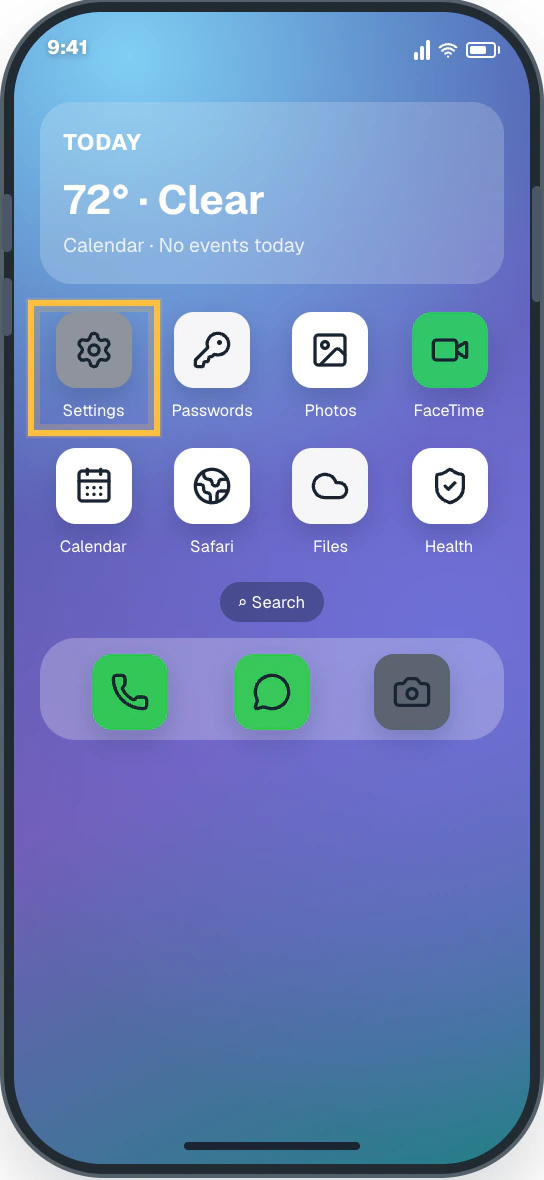 Easy Phone Tech visual example. Personal details are fictional; exact wording can vary.Open a larger picture
 Step 2Tap Accessibility
Scroll a little and tap Accessibility.
You should now see: The Accessibility screen opens with its main groups.
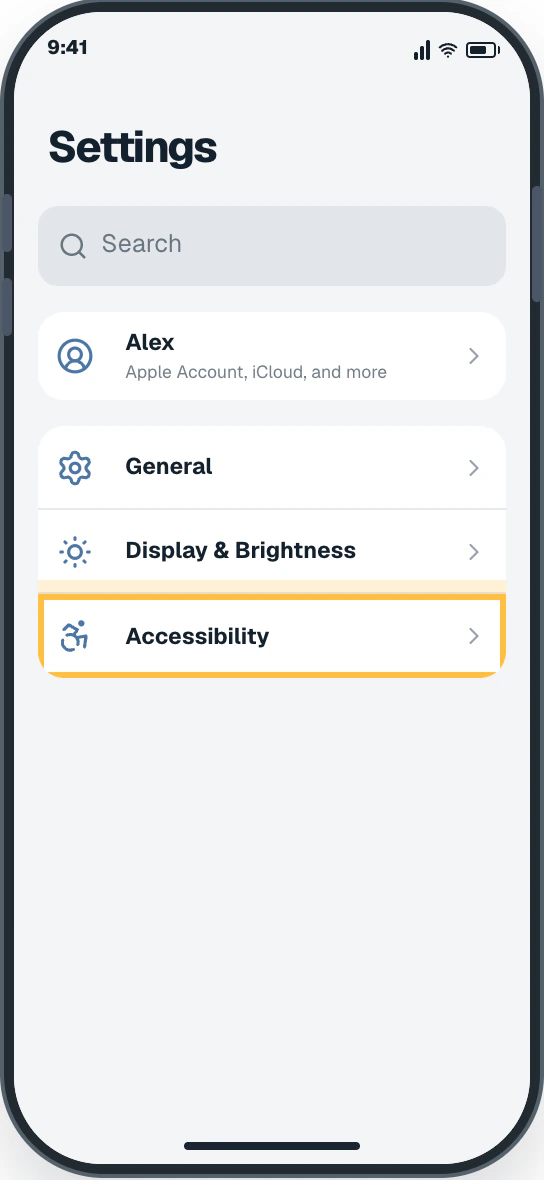 Easy Phone Tech visual example. Personal details are fictional; exact wording can vary.Open a larger picture
 Step 3Choose what you need
Start with Display & Text Size, Audio & Visual, or Touch.
You should now see: Display & Text Size, Audio & Visual, and Touch are visible as choices.
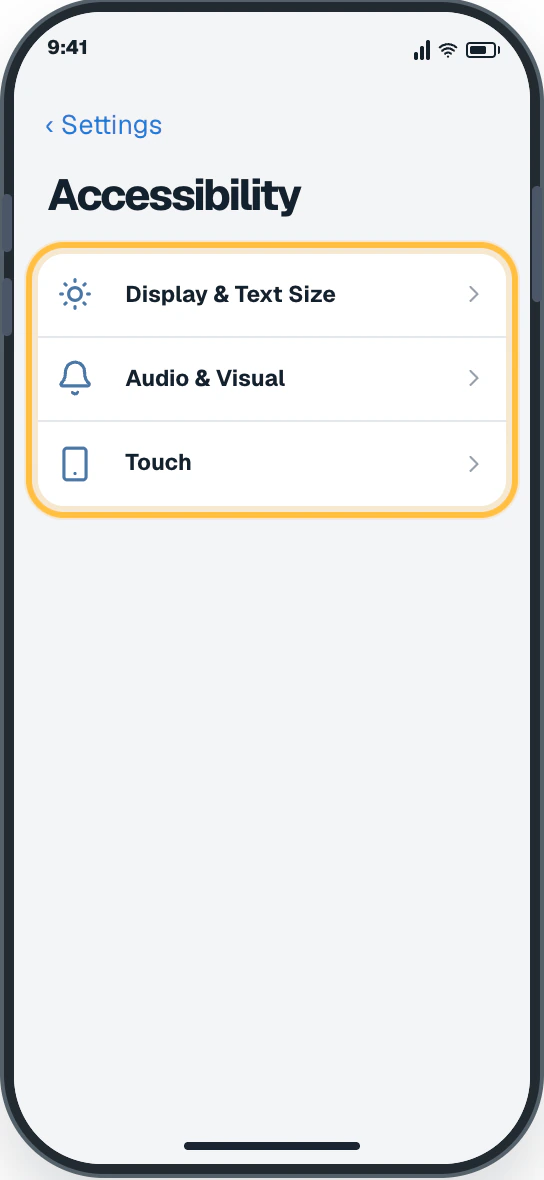 Easy Phone Tech visual example. Personal details are fictional; exact wording can vary.Open a larger picture
My screen looks different
That is normal. Phone makers sometimes move or rename a setting.
- Stay with the task “Find iPhone accessibility settings” and re-read the current action before tapping anything else.
- If the named control is missing, open the official source below or search for a different task.
Open the official help page Sources and review details
Modern full-screen iPhones · iOS 26 · Reviewed August 31, 2026
Step images are original Easy Phone Tech visual examples based on the cited paths. They are not manufacturer screenshots.
Check the result
Did this solve it?